iPsiq
Co-founder and full stack engineer – present
Overview
Platform in development for scheduling and paying for mental health consultations, with a dedicated page for each doctor and a back-office for the team.
- Designed and built the back-end (NestJS, TypeORM, PostgreSQL, Zod) and front-end (React, Vite, TanStack Query, Tailwind).
- Booking with temporary holds and double-booking protection, cascading prices by specialty and doctor, and audit logs written in the same transaction.
- Payment split at booking time via Asaas (sub-accounts, invoices and subscriptions), in progress.
- Full local environment in Docker with LocalStack (S3, SES), automatic AWS deploy on every push, and an LGPD data-anonymization flow.
Quality and delivery
- Over 500 automated tests, continuous integration on every push and automatic AWS deploys.
- About 48 thousand lines of TypeScript, 36 database migrations and 240 commits in three weeks.
- Isolation between professionals (none can reach another's data, not even through the API) is proven by integration tests in CI.
Security and access control
- Closed by default: every route declares who may call it, and roles are sets of permissions, with per-person extra permissions, always with a reason and history.
- A read-only profile that shows the patient only by code and hides name, e-mail, phone and ID number, with a test that walks every route.
- Sessions with a refresh token in an HttpOnly cookie, login-attempt lockout, booking limits per IP and per patient, and third-party keys encrypted.
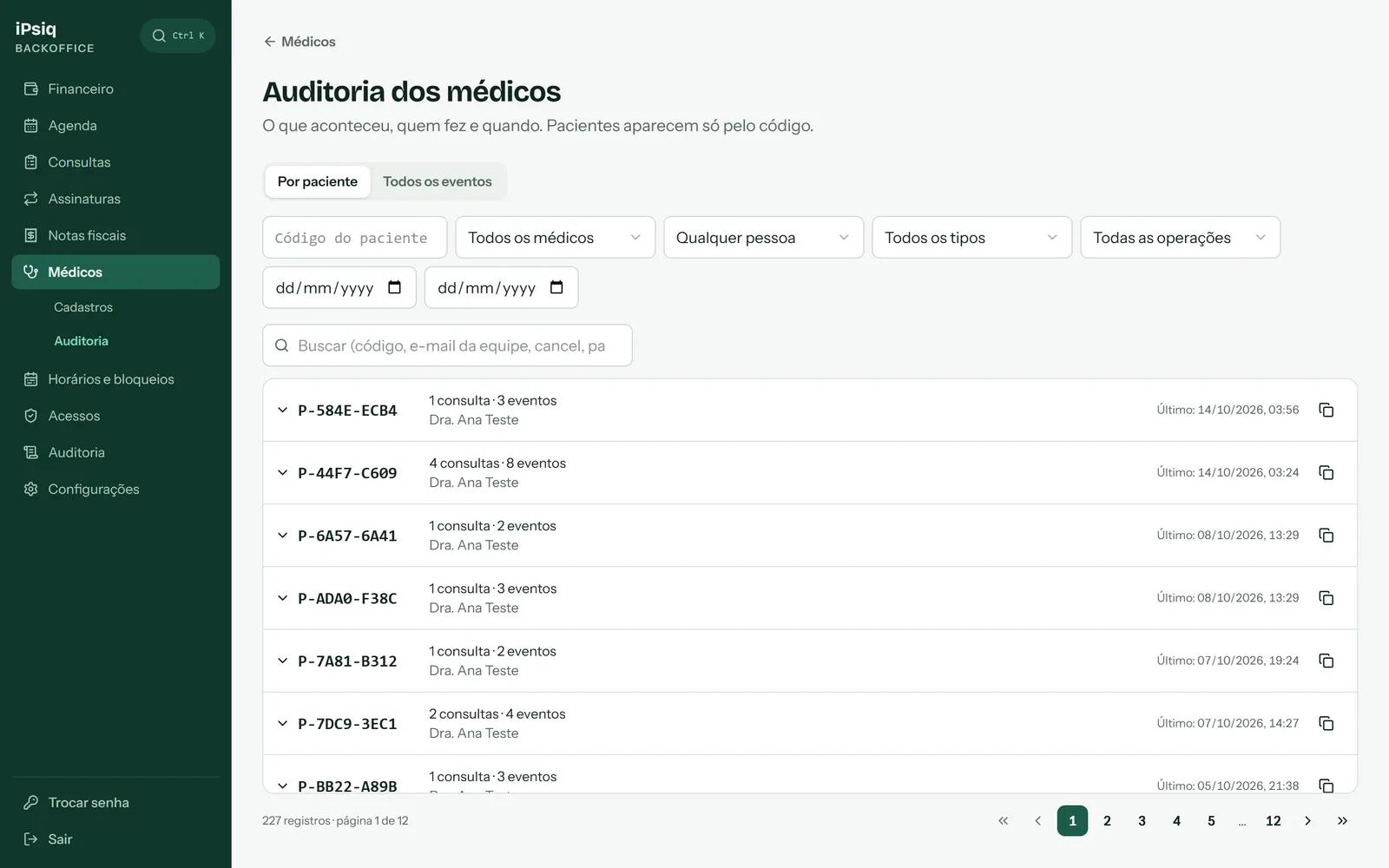
- Audit of everything that changes in the system, written in the same transaction, filterable by period, person, doctor and patient code.
Privacy and LGPD
- Data minimization: no patient data in logs, URLs or ad events, and the full ID number is not stored, only masked and as a keyed hash for lookups.
- Prescription data is collected only after payment, encrypted, with each doctor access audited; the platform does not issue prescriptions.
- Data subject rights: on-demand patient anonymization, ad source erased after 180 days, and an encrypted database backup with limited retention.
- Cookies: no pixel before consent, choice by category and recorded consent; hashed e-mail and phone are not sent to ad platforms.
CFM and professional-council rules (CRM)
- Each professional is shown with their council registration (CRM, CRP or CRN); psychologists and nutritionists are not shown as doctors or with a medical specialty.
- A medical specialty is only displayed with an RQE, following CFM rules; without an RQE the professional appears simply as "Doctor".
- Each public profile's label follows CFM Resolution 2,336/2023, on medical advertising.
- A professional only goes live on the site after completing the activation checklist and being activated by the team.
AWS infrastructure
- Secrets in SSM Parameter Store, transactional e-mails in SES and photos in S3 with signed URLs.
- Daily database backup to S3, encrypted with 30-day retention, and automatic deploys on every push to the main branch.
Public site
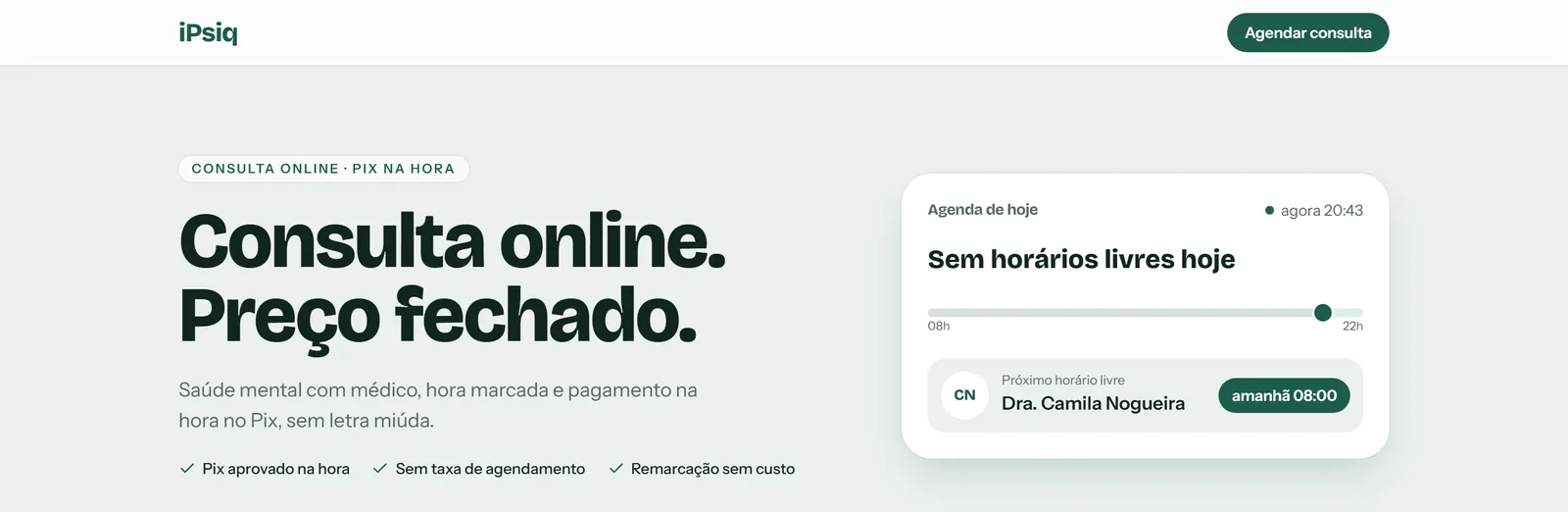
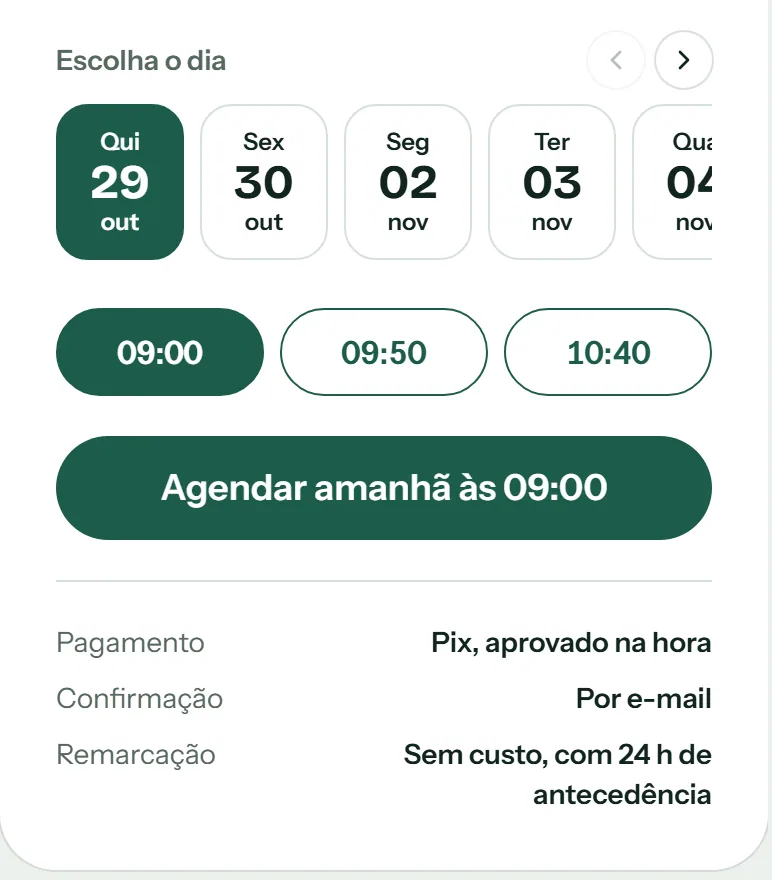
What the patient sees: the home page and each professional's page, with booking in a single flow.
- The chosen slot is held for a while, with protection against double booking.
- Payment is made via Pix at booking time, and the appointment is confirmed right away.
- Rescheduling is free, with 24 hours' notice.
Screenshots from a development environment, with fictitious data.
Doctor area
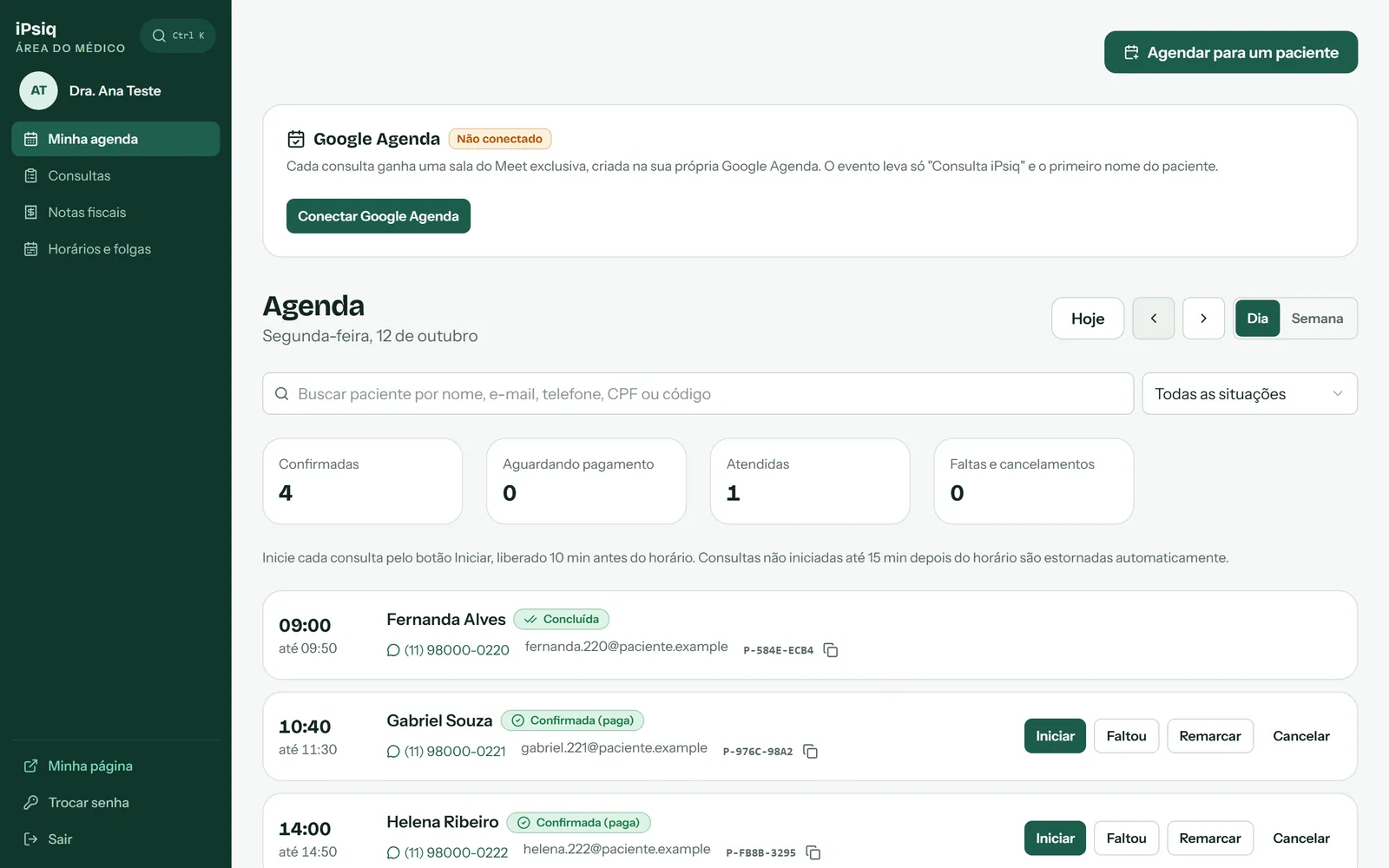
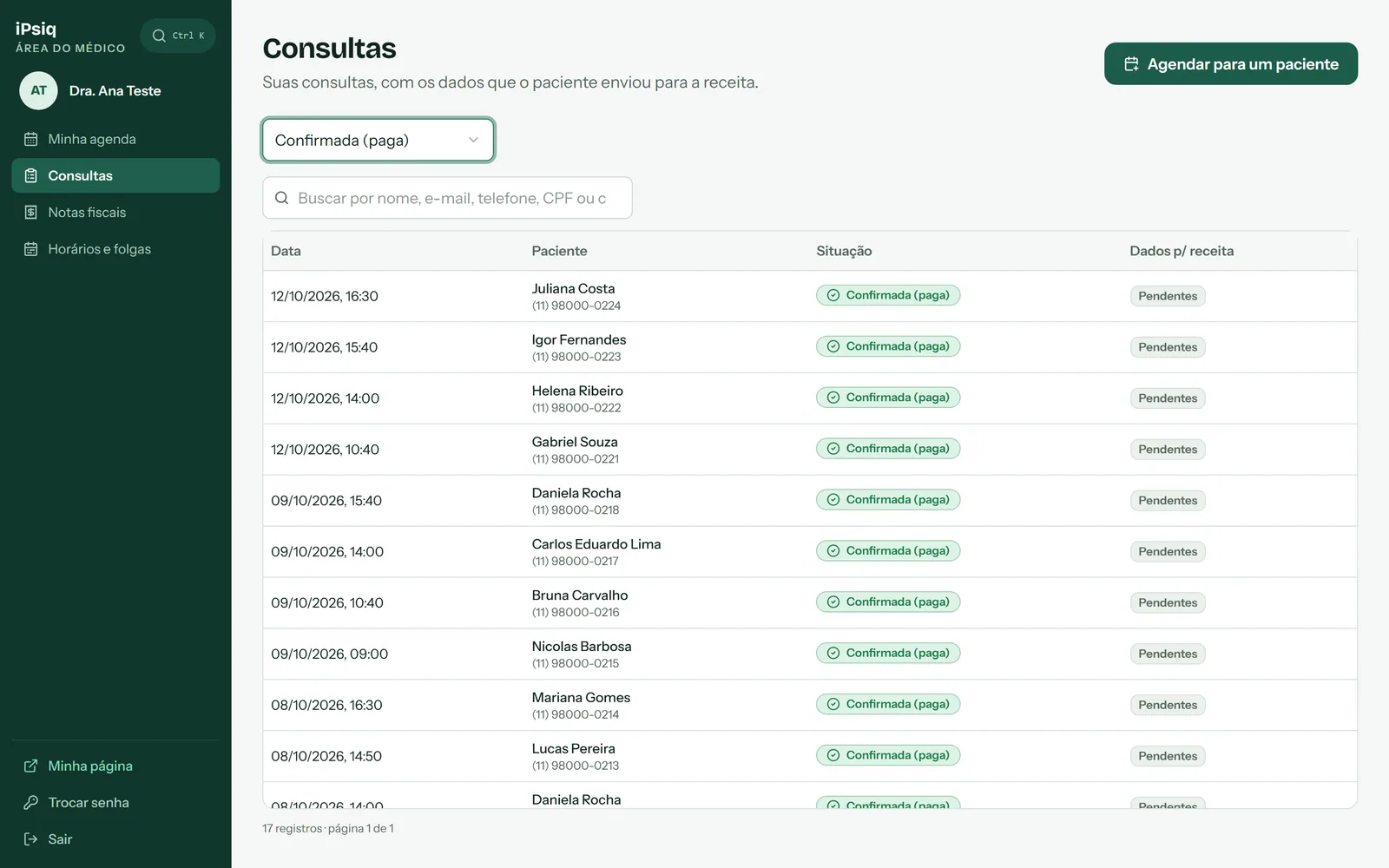
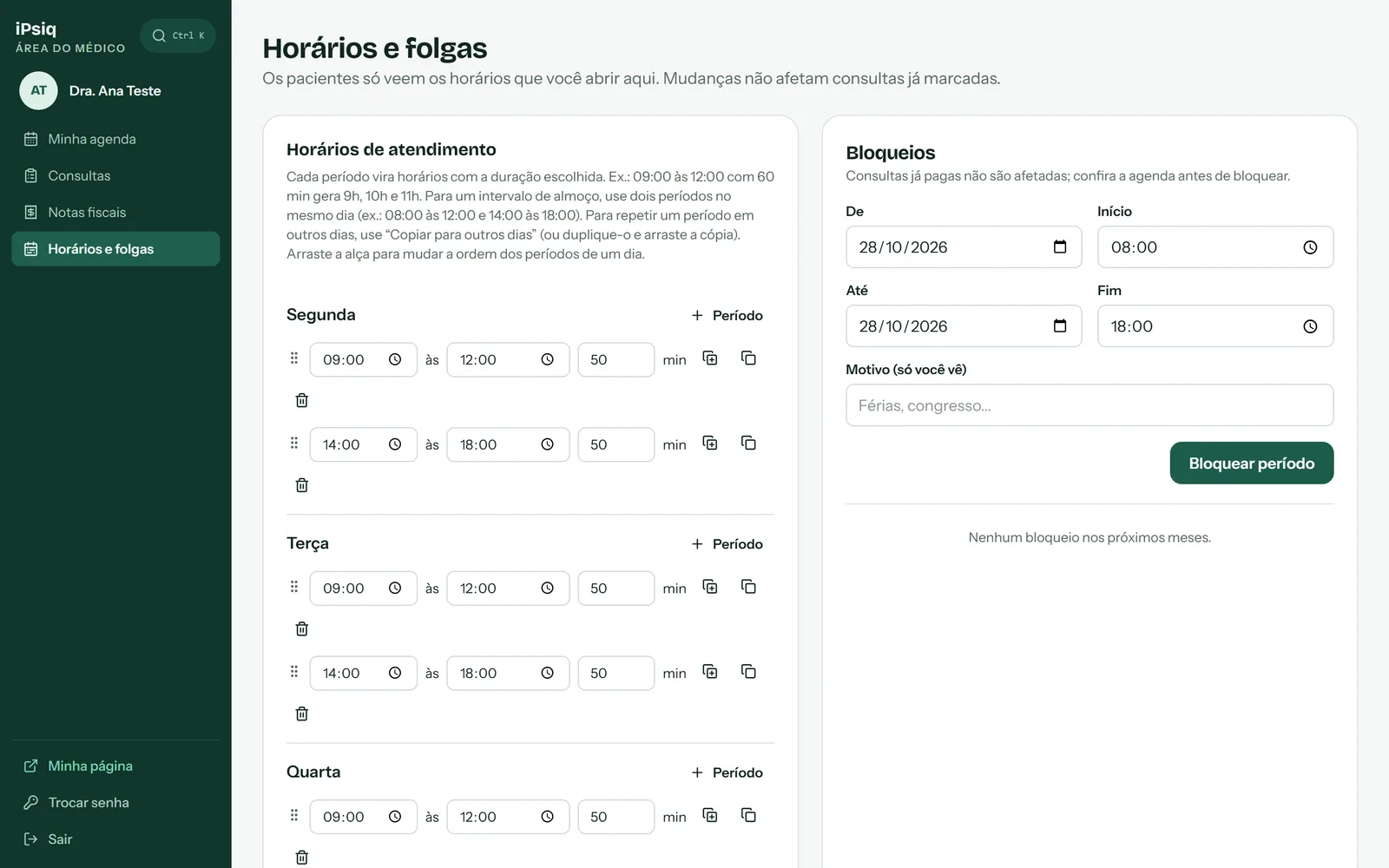
Each professional signs in with their own login and sees only their own data: agenda, appointments, invoices and schedule.
- No professional can reach another's data, not even through the API: this is proven by integration tests in CI.
- The appointment is started with the Start button, enabled 10 minutes before; appointments not started within 15 minutes after the scheduled time are refunded automatically.
- With Google Calendar connected, each appointment gets its own Meet room, created in the professional's own calendar; the event carries only "iPsiq appointment" and the patient's first name.
- Weekly availability and time off; changes do not affect appointments already booked.
Screenshots from a development environment, with fictitious data.
Back-office
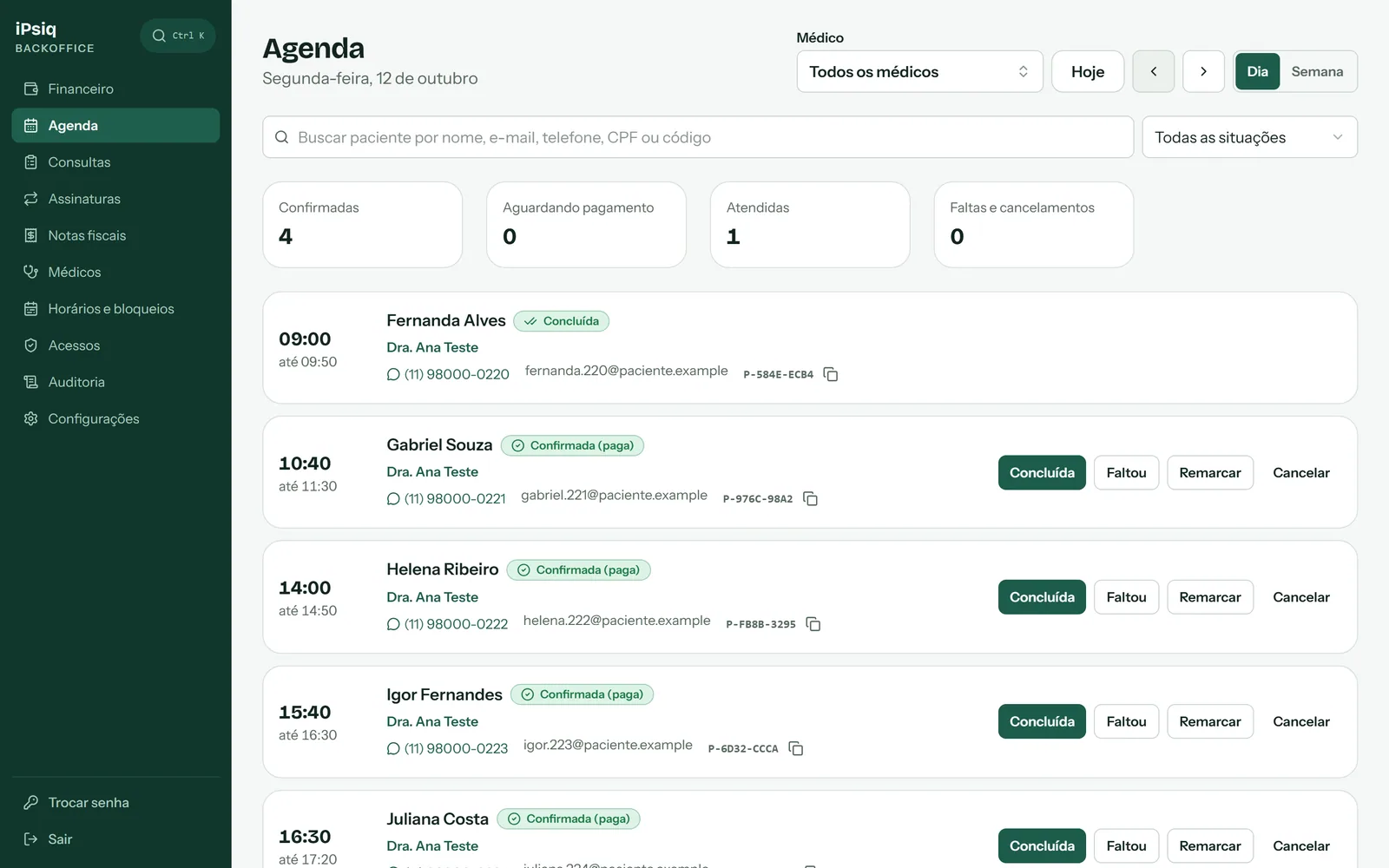
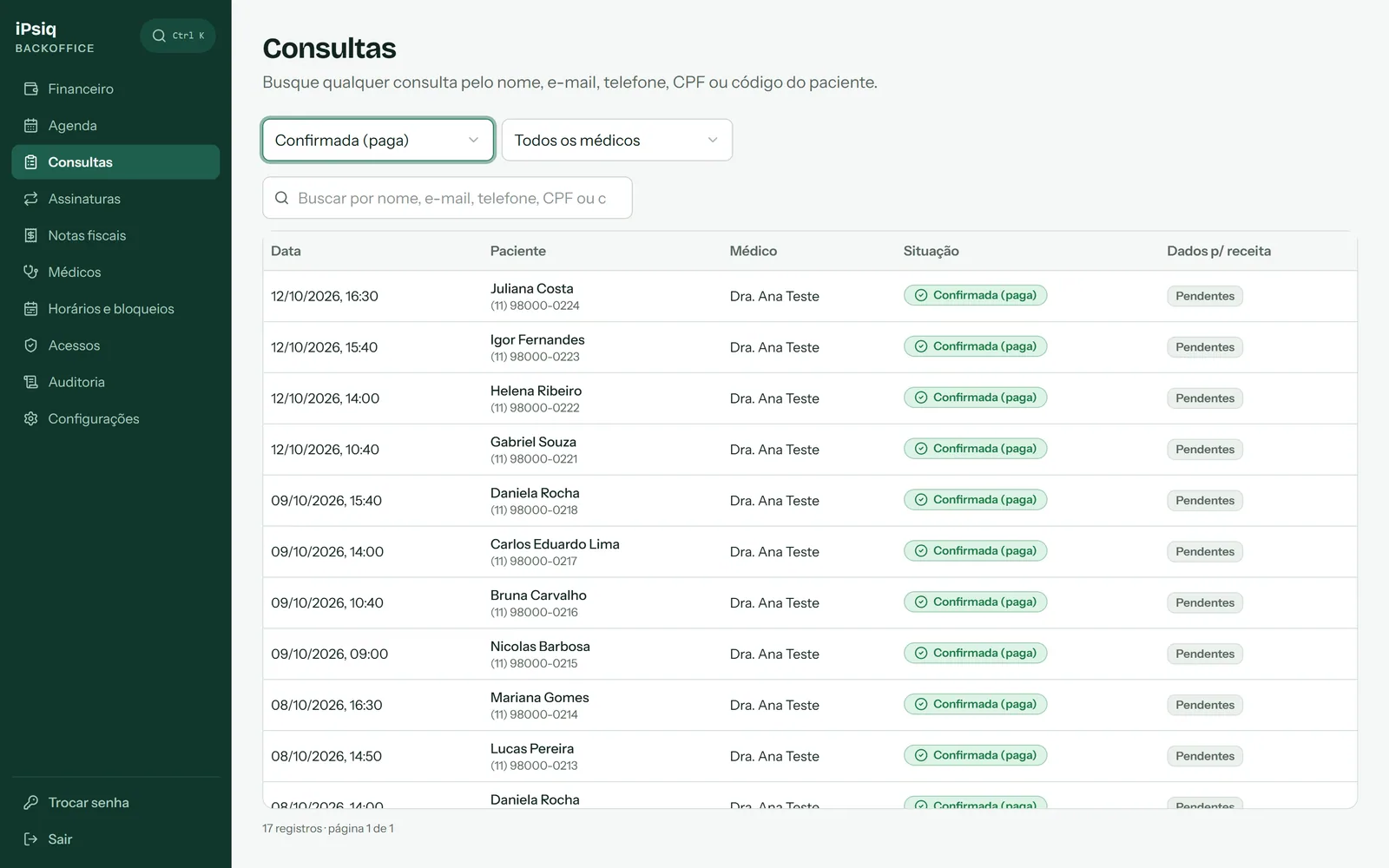
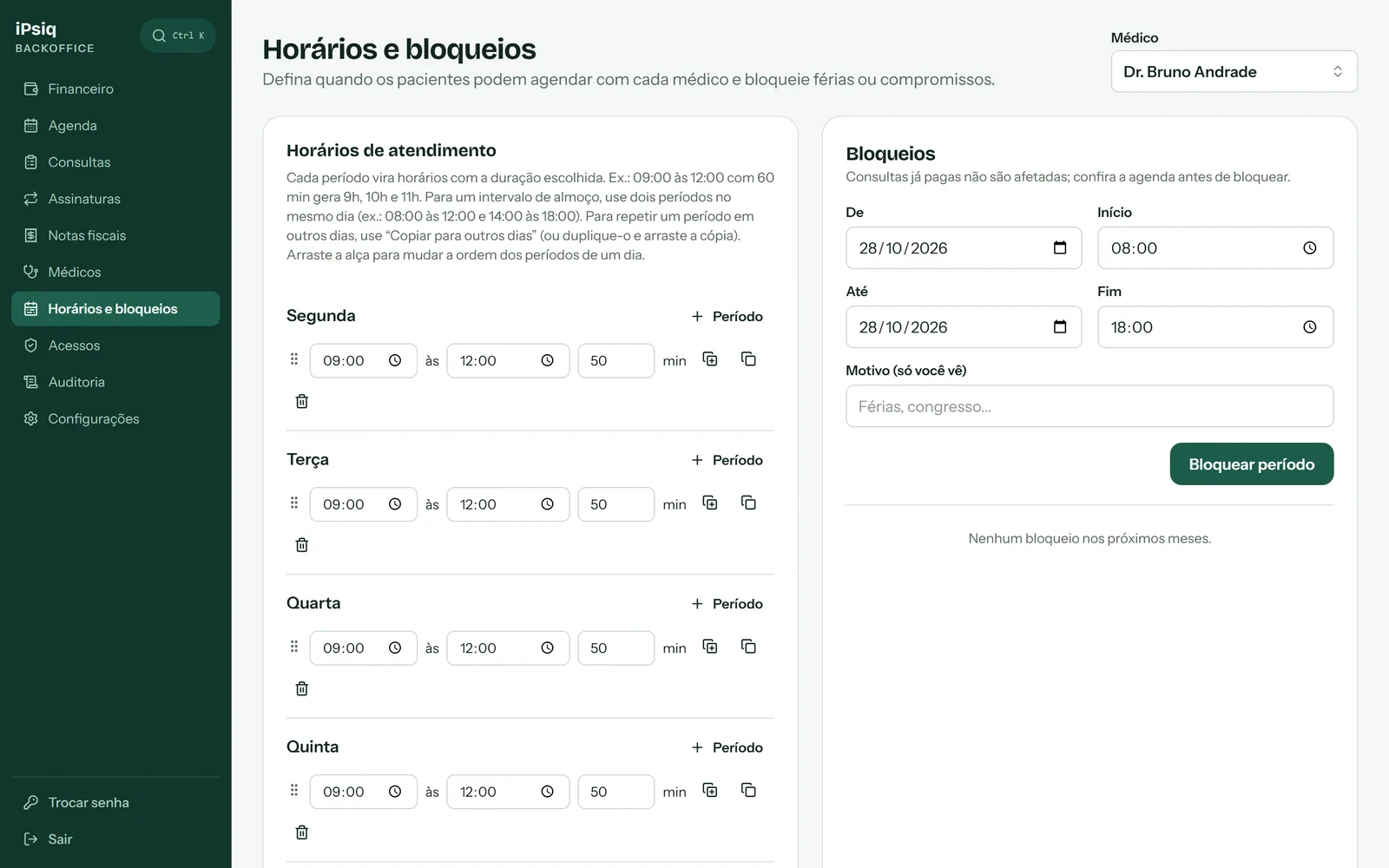
The team follows the agenda, appointments, doctors and schedules in one place.
- Appointment search by name, e-mail, phone, ID number or patient code, with status and doctor filters.
- Quick agenda actions: complete, mark no-show, reschedule and cancel; rescheduling requires a reason, which goes to the audit trail.
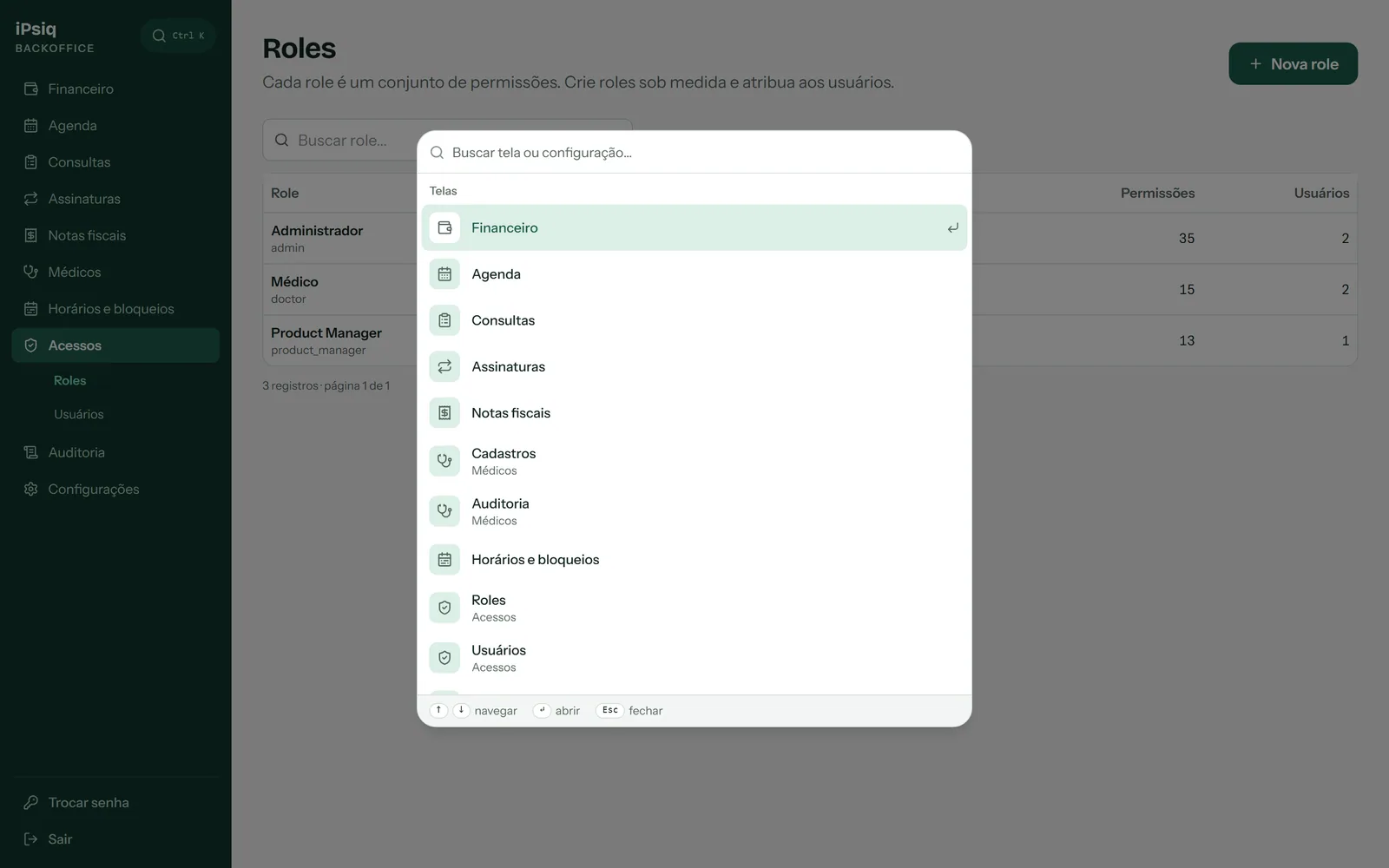
- Command palette (Ctrl K) to jump straight to any screen or setting.
Screenshots from a development environment, with fictitious data.
Access and permissions
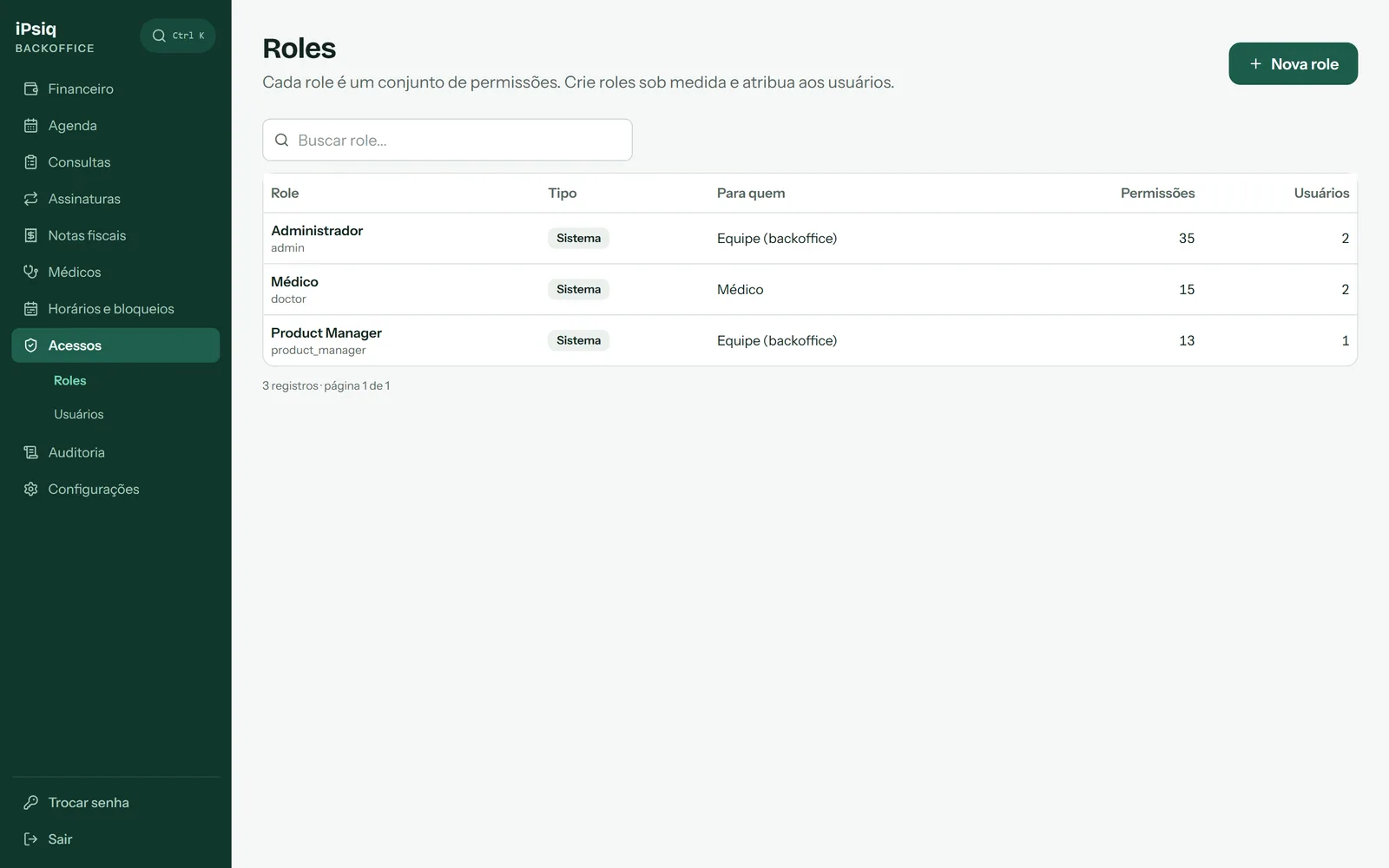
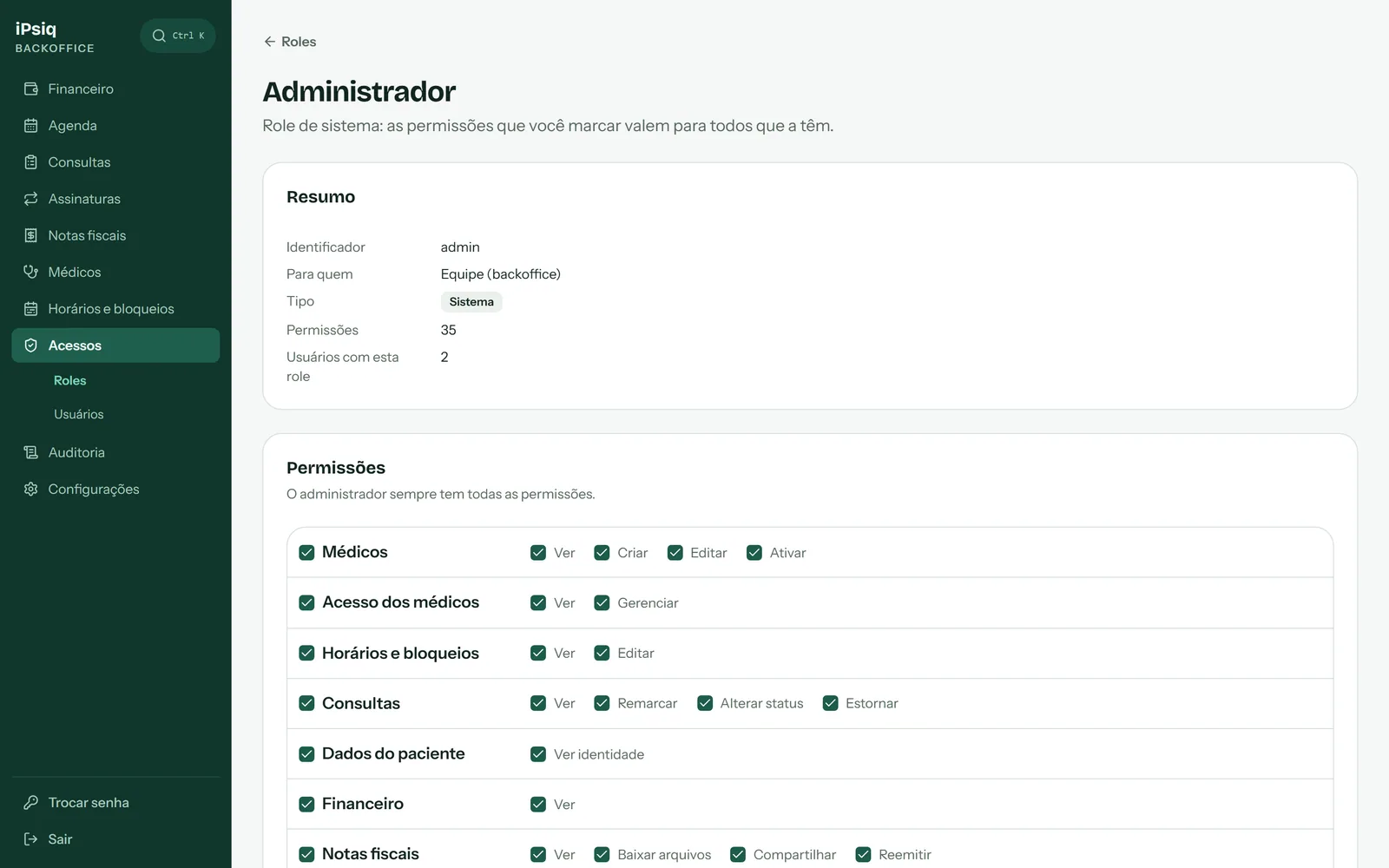
Permission-based RBAC: roles are sets of resource-and-action permissions, access is closed by default and every route declares who may call it.
- A permission is a resource:action pair, a role is a set of permissions and each person has one role; on every request the guard combines the role with the person's extra permissions that have not been revoked.
- The catalog lives in a typed file: the decorator only accepts permissions that exist. On startup, the app syncs the catalog with the database (creates and removes permissions), with auditing.
- Audience: every role and permission belongs to staff or to doctors, and doctor permissions (own-*) can only join doctor roles, which the database also enforces. Per-doctor isolation lives in the route: the permission says what a person may do, not on whose data.
- System roles: the Administrator is fixed (always every permission, not editable, so nobody locks themselves out); Doctor and Product Manager can be adjusted on screen, and the file is only a starting point: the sync never undoes what was changed there. None can be deleted or renamed.
- Custom roles are built in a resource-by-action matrix, and each role has its history (who changed it, when, what came in and what went out); a role that has users cannot be deleted.
- Grant rules: nobody grants a permission they do not have, nobody grants themselves a permission, and a role change is never one's own, never to a different audience and never of the last administrator.
- Per-person extra permissions require a reason when granted and when revoked, record who granted them and when, show up in the same timeline as the audit, and take effect on the next action, with no new login.
- Product Manager, read-only: view permissions only, with the exact list of routes locked in a test (a new route stays closed to this role until someone adds the permission on purpose) and patients only by code; a test walks all of its routes with real data and fails if any personal data shows up.
- The front end decides areas and buttons from the permissions (audience and permissions come from the session endpoint), with guards by audience and by permission, and the server remains the one that decides.
// permissions.config.ts
export const PERMISSIONS = {
  'recurso:ver': { audience: 'staff' },
  'recurso:editar': { audience: 'staff' },
  'own-agenda:view': { audience: 'doctor' },
} as const;

export type Permission = keyof typeof PERMISSIONS;

// @Permissions('recurso:ver')    -> compila
// @Permissions('recurso:vre') -> erro de compilaçãoScreenshots from a development environment, with fictitious data.
Code and decorators
The back-end is NestJS and TypeScript, with security and validation declared on the route itself, through decorators, pipes and global filters, and checked by tests.
- Four decorators cover every route's access: @Public() (open), @Authenticated() (any logged-in person) and @Permissions(...) (the role must grant all of the permissions), plus @CurrentUser() and @CurrentDoctorId() to read the person from the session.
- The global guard fails closed: a route that declares no access is refused, and a test (access-control.spec) walks every route to guarantee it.
- Permission names in @Permissions are checked at compile time against a typed catalog, so a typo does not compile; the catalog is synced with the database on startup, with auditing.
- The token is just the key: role, permissions and doctor come from the live session on every request, so logout, deactivation, password changes and role changes take effect on the next call.
- @CurrentDoctorId() hands over the session's doctor: doctor routes never receive the id from the URL or the body, which closes the door to reading another doctor's data (IDOR).
- Validation at the edge: the ZodValidationPipe validates and transforms the body with a Zod schema and returns one message per invalid field, in the path: message format.
- A global exception filter standardizes the API error, maps Postgres integrity errors to 409 or 400 instead of 500, hides the real message of unexpected errors in production and logs every 5xx, without letting link tokens reach the logs.
- Personal data: field encryption with AES-256-GCM, with the key outside the database, and a keyed hash (HMAC-SHA256) to look a value up without storing it, such as the ID number.
- Every repository is tenant-scoped: the tenantId is part of every query and every update, which prevents access across contexts.
- Passwords with Argon2 and a password policy, login-attempt lockout per account and a rate limiter on the login routes.
- Standards the team follows and tests enforce: writes only through repositories (a test rejects raw SQL), migrations with a working rollback, typed enums, generic components on the front end, and code comments in English with on-screen text in Portuguese.
- make check runs types, lint and tests inside Docker, and CI repeats it on every push.
@Controller('exemplo')
export class ExemploController {
  // Qualquer pessoa logada, seja qual for a role.
  @Get('eu')
  @Authenticated()
  quemSouEu(@CurrentUser() user: AuthenticatedUser) { /* ... */ }

  // A role precisa conceder TODAS as permissões citadas;
  // o nome é checado em tempo de compilação contra o catálogo tipado.
  @Post()
  @Permissions('recurso:acao')
  criar(@Body(new ZodValidationPipe(CriarSchema)) dto: CriarDto) { /* ... */ }

  // O médico vem da sessão, nunca da URL nem do corpo.
  @Get('minha-agenda')
  @Permissions('own-agenda:view')
  agenda(@CurrentDoctorId() doctorId: string) { /* ... */ }

  // Rota aberta (ex.: página pública), declarada de propósito.
  @Public()
  @Get('publico')
  publico() { /* ... */ }
}Audit and history
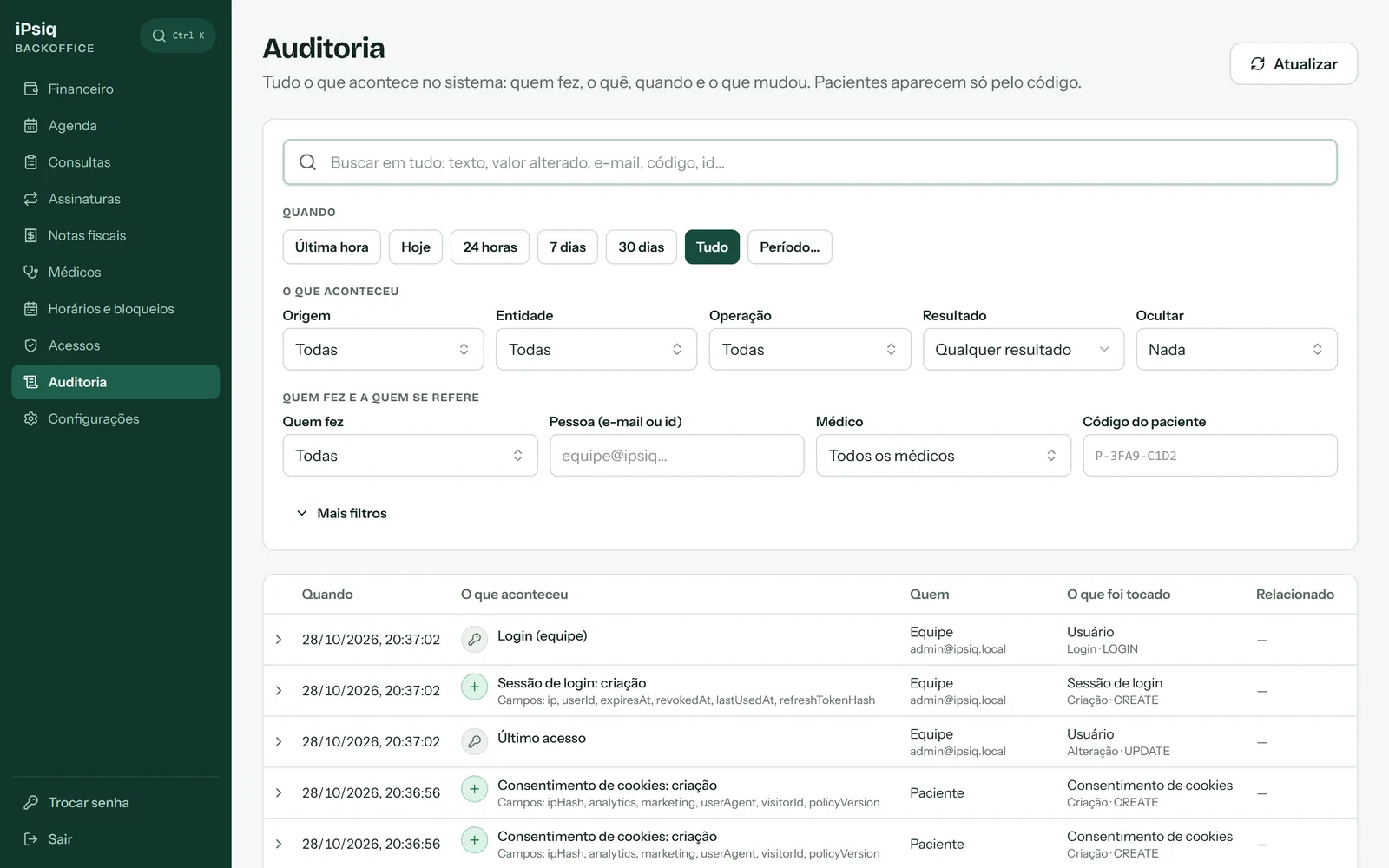
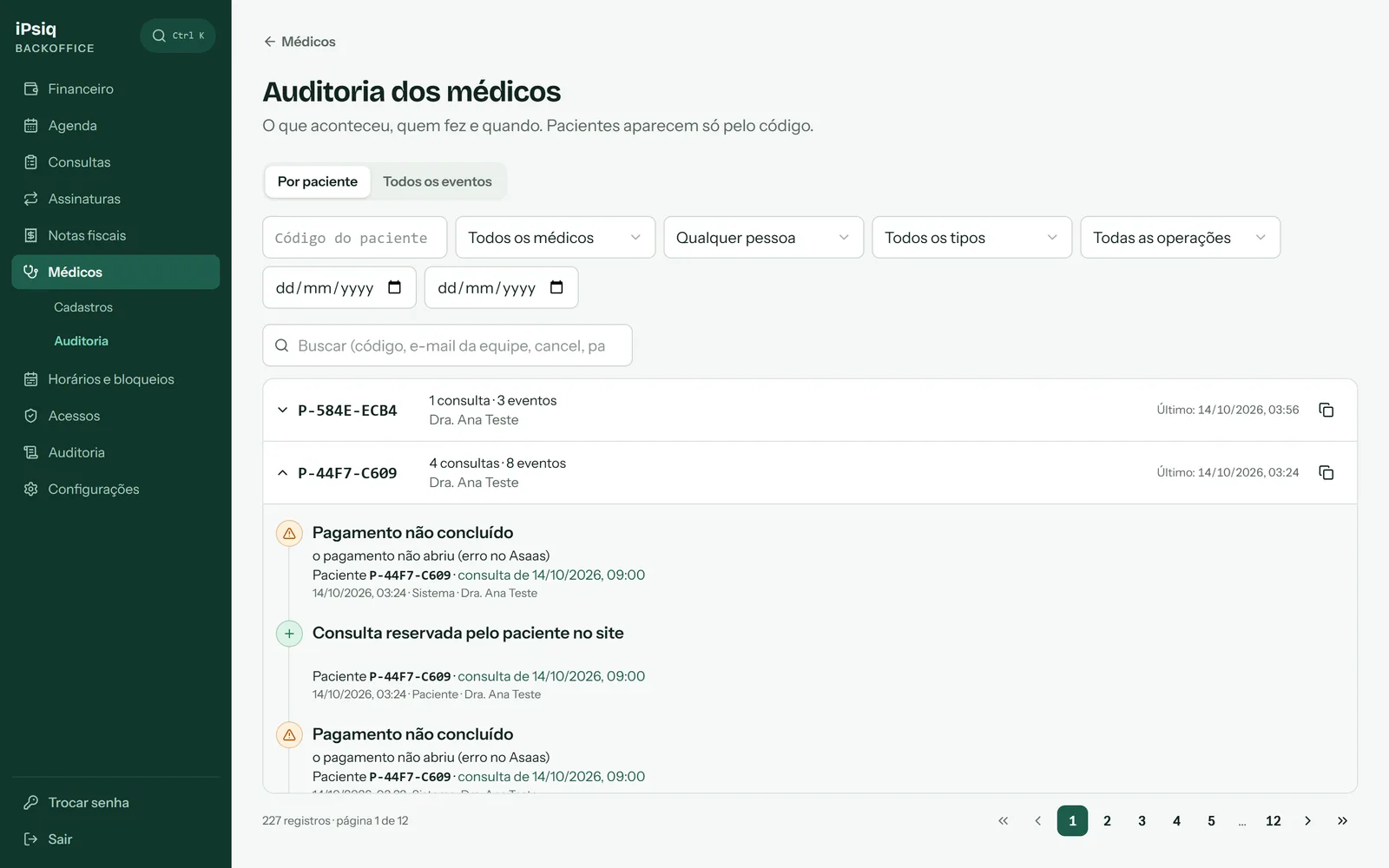
Every data change leaves a record of who did it, what, when and what changed, and the history cannot be edited or deleted.
- Every repository extends a BaseRepository: every write (create, update, delete and restore) records its audit event in the same transaction as the business write, so either both are saved or neither is.
- Failed writes are also recorded, with a failure result, outside the failed transaction.
- The caller states exactly which fields changed, so what is audited is what changed; a deletion keeps the deleted record so the history says what it was.
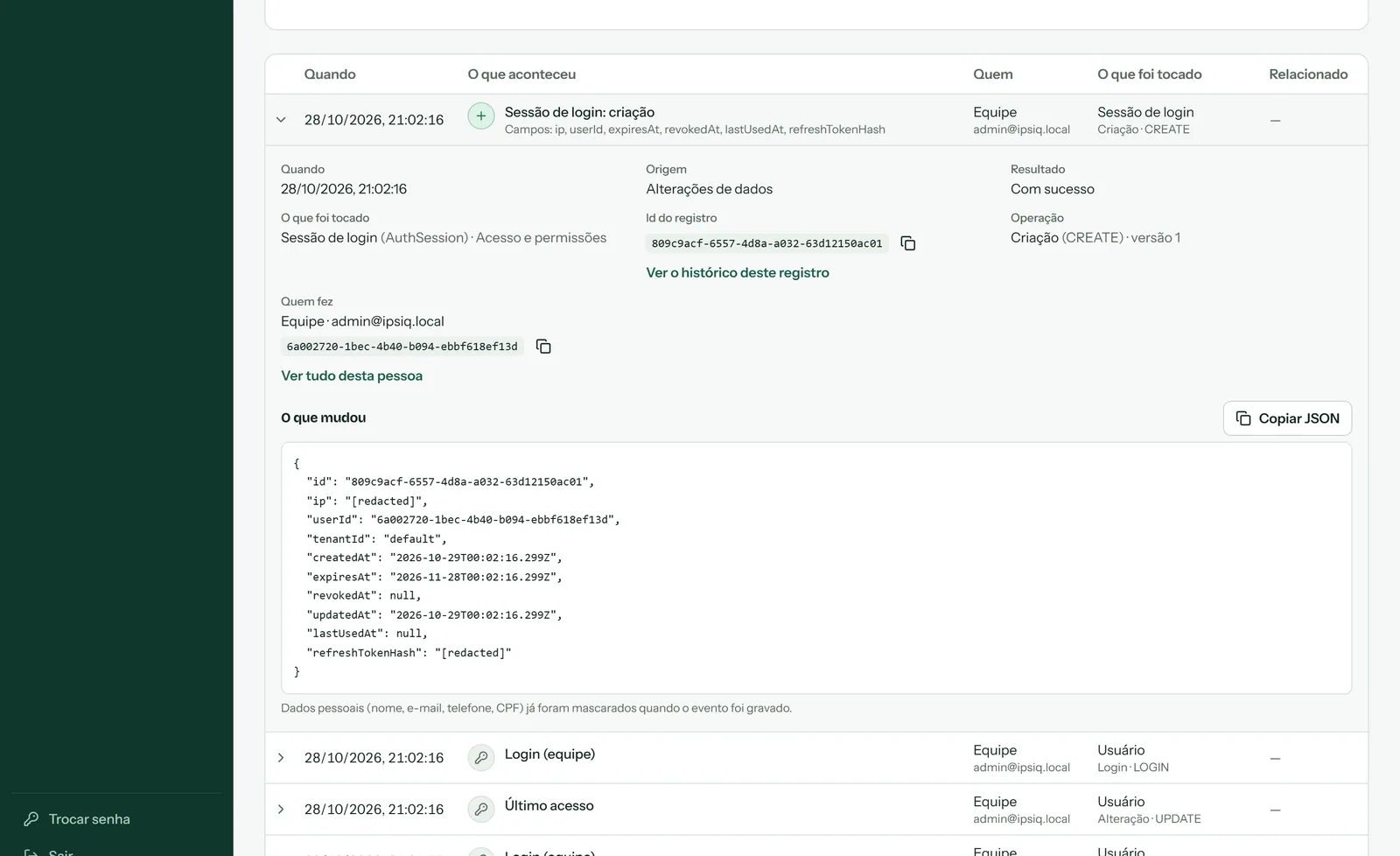
- Each record has a version (1, 2, 3…) per entity, with "see this record's history" and "see everything from this person".
- The audit table is append-only: the database itself refuses UPDATE, DELETE and TRUNCATE (LGPD art. 37: the record of operations must be trustworthy).
- Passwords, tokens, ID numbers, e-mails, IPs and patient data are masked in the diff, because the trail cannot be erased; patients appear only by code.
- All business tables have history: a test fails if a raw INSERT, UPDATE or DELETE shows up outside the exceptions. Only technical records (login counters, e-mail and webhook sent marks, OAuth codes and session cleanup) are left out, with an explicit, justified audit: false.
- Events become sentences in the team's own words (for example, "Appointment booked by the patient on the site" or "Login (staff)"), each with a title, a detail and a tone (access, problem…); the list shows only the names of the fields that changed, and the full diff is one click away.
- The trail brings different sources into a single timeline: data changes, e-mails sent, payment provider notices (webhooks) and ad conversions, with login failures and session-refresh rejections also recorded as events.
- Each event is linked to what it touches (doctor, appointment and patient, by code), which allows filtering by period, source, entity, operation, result, doctor, patient code and who did it (staff, doctor, patient or system), and grouping the history by patient.
- A "Hide" filter hides what is very common (logins, login failures, e-mails, webhooks and conversions) so the rest stands out, and new entities show up in the audit on their own, by technical name, even before they get a label in the catalog.
- Future: every write goes through a single point (writeAuditEvent), synchronous and in the same transaction today because iPsiq has no queue. Since the write is idempotent by id, that point can be swapped for an event emission (outbox pattern) to move auditing to a microservice, without touching the repositories' code.
Screenshots from a development environment, with fictitious data.
Data redaction
Data that must not be disclosed or spread is masked in layers: in the audit trail, in logs, on screens, in API responses and in events sent to third parties.
- A central redaction function is applied to every audit diff before it is written: it walks the object at any depth and replaces with [redacted] the credential fields (passwords, tokens, hashes, API keys, certificates, encrypted fields) and the personal-data fields (ID number, e-mail, IP, the patient's name, e-mail and phone, ad and visitor identifiers, user agent and room link).
- The reason is the trail's own rule: since it is append-only, any personal data written there could never be erased (LGPD). The record ids are enough to follow the history.
- When the list of protected fields grew, a migration applied the same redaction to the older audit rows: the trigger that protects the table is switched off only during that one-off cleanup and switched back on right after, even on error.
- Logs and screens: e-mails become, for example, lu***@domain and the ID number is stored masked, with a keyed hash for lookups; link tokens (booking, invoice, setup) become [token] in logs, keys are never logged, and the payment provider key never appears on screen.
- Who can see a patient's identity is a permission (patients:view-identity): without it, the person sees only the patient code, personal data is left out of the responses and searching by name, e-mail, phone or ID number is ignored; the code is derived from a keyed hash and cannot be traced back to the ID number.
- A test walks every route of the read-only profile with real data and fails if any personal data shows up.
- Third parties: no health or patient data goes into logs, URLs or ad events; hashed e-mail and phone are not sent to ad platforms without legal sign-off and specific consent; and in production the real message of unexpected errors is hidden.
auditoria   { "ip": "[redacted]", "refreshTokenHash": "[redacted]", "userId": "..." }
e-mail      lucas@clinica.com            ->  lu***@clinica.com
log (URL)   /agendamento/<token longo>   ->  /agendamento/[token]
paciente sem patients:view-identity -> apenas o código P-XXXX-XXXXAsaas integration
The patient pays via Pix, with automatic transfer to the professional (split) and a dedicated account for each one.
- Each professional has a sub-account: each appointment's charge is created in it, with the split going to iPsiq's wallet.
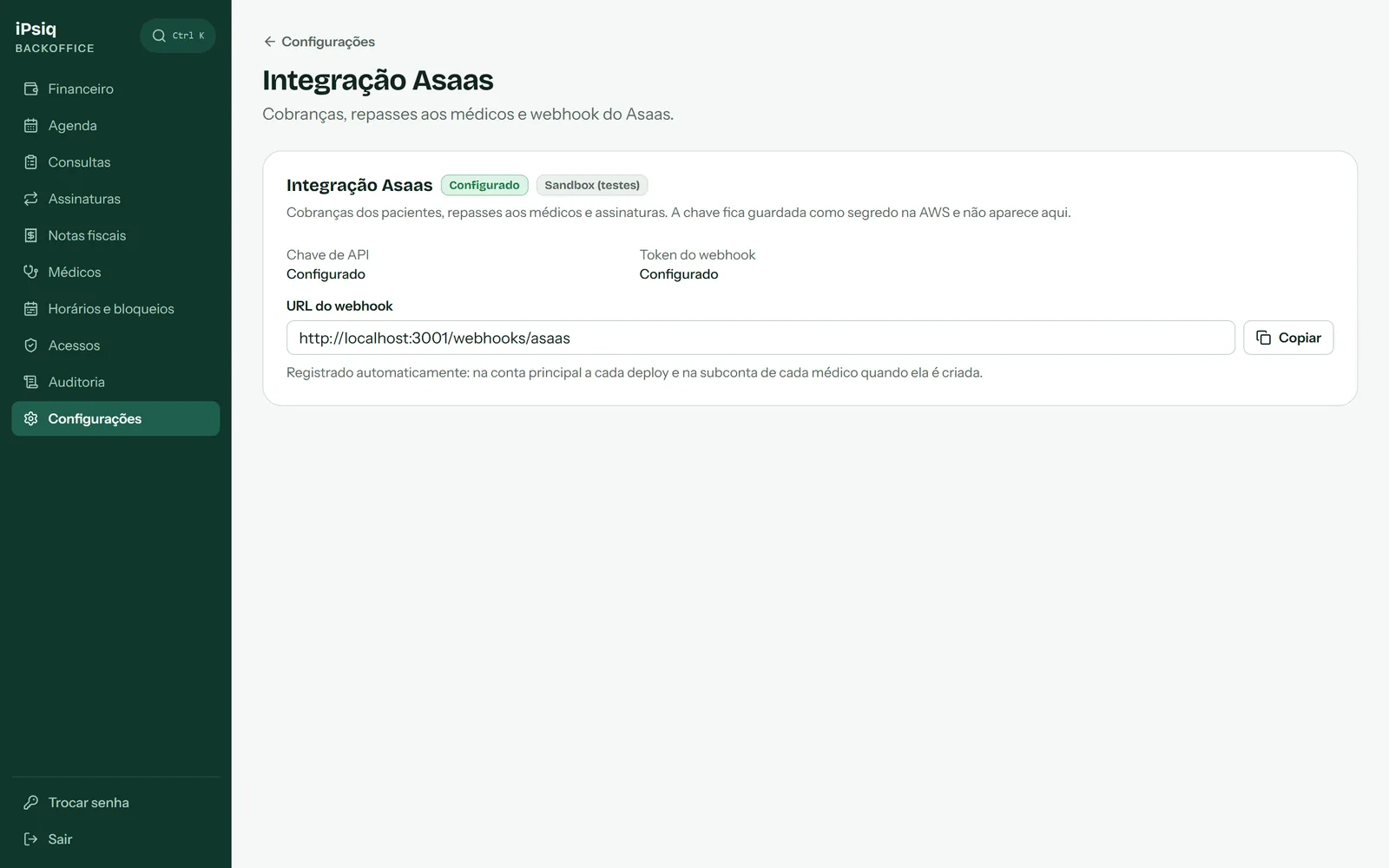
- The API client is thin and each call states which account it acts on (the main one or the sub-account); keys never go to logs.
- The key is kept as a secret on AWS, read at run time and never shown on screen; the environment (sandbox or production) is a setting.
- Webhooks are authenticated by token with a constant-time comparison, processed once per event id, and registered automatically on deploy and when each sub-account is created.
- The charge carries the appointment as a reference to reconcile payments, and a full refund reverses the split.
- The sub-account holder's data goes straight to Asaas, through a single-use link, and iPsiq does not store it.
- What the patient can fix appears in the form; a configuration error shows a generic message and alerts the team with the exact reason, and the provider's technical message never reaches the patient.
- Tests do not depend on the network: a local fake Asaas simulates the provider.
Screenshots from a development environment, with fictitious data.
Settings
The platform's defaults and integrations in one place, searchable by screen or field; changes go through the same audit trail.
- Example: the tolerance for starting an appointment, after which an unstarted appointment is refunded automatically.
- The screens for commercial and tax rules are not shown here.
Screenshots from a development environment, with fictitious data.
